
在base.css中加入该样式
一、样式一【推荐】
box-shadow方式
::-webkit-scrollbar {
  width: 8px;
  height: 6px;
}

::-webkit-scrollbar-thumb {
  border: 1px solid rgb(0 0 0 / 0%);
  border-radius: 10px;
  box-shadow: 6px 0 0 #e3e3e3 inset;
}

::-webkit-scrollbar-thumb:hover {
  box-shadow: 6px 0 0 #e3e3e3 inset;
}
二、样式二
::-webkit-scrollbar {
  width: 6px;
  height: 6px;
}
::-webkit-scrollbar-track {
  background: none;
  /* background: rgb(239, 239, 239); */
}
::-webkit-scrollbar-thumb {
  background: #999999; /* #bfbfbf */
  border-radius: 10px;
}
三、样式三
/*全局滚动条样式*/
::-webkit-scrollbar {
    width: 5px;
    height: 14px;
}

 ::-webkit-scrollbar-thumb {
/* background-color: #01c8dc;
border-radius: 3px; */
    background-color: #b6b6b6;
}
/*全局滚动条样式结束*/
如果想局部的话就在想要改变滚动条样式的vue文件中写上CSS样式即可。
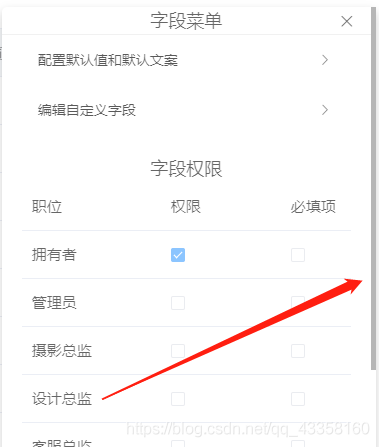
表格限高需要修改的滚动条样式
/* el-table 滚动条样式 */
.el-table--scrollable-y .el-table__body-wrapper::-webkit-scrollbar {
    width: 10px;
}

.el-table--scrollable-y .el-table__body-wrapper::-webkit-scrollbar-thumb {
    border-radius: 10px;
    background: rgba(0, 0, 0, 0.2);
}

.el-table--scrollable-y .el-table__body-wrapper::-webkit-scrollbar-track {
    border-radius: 10px;
    background: rgba(0, 0, 0, 0.1);
}

.el-table__header-wrapper .has-gutter th:nth-last-child(2) {
    border-right: 0;
}
/* el-table 滚动条样式结束 */